advanced image cropper
Drop image to start
PNG, JPG, WEBP — 100% private
From Original to Perfectly Cropped
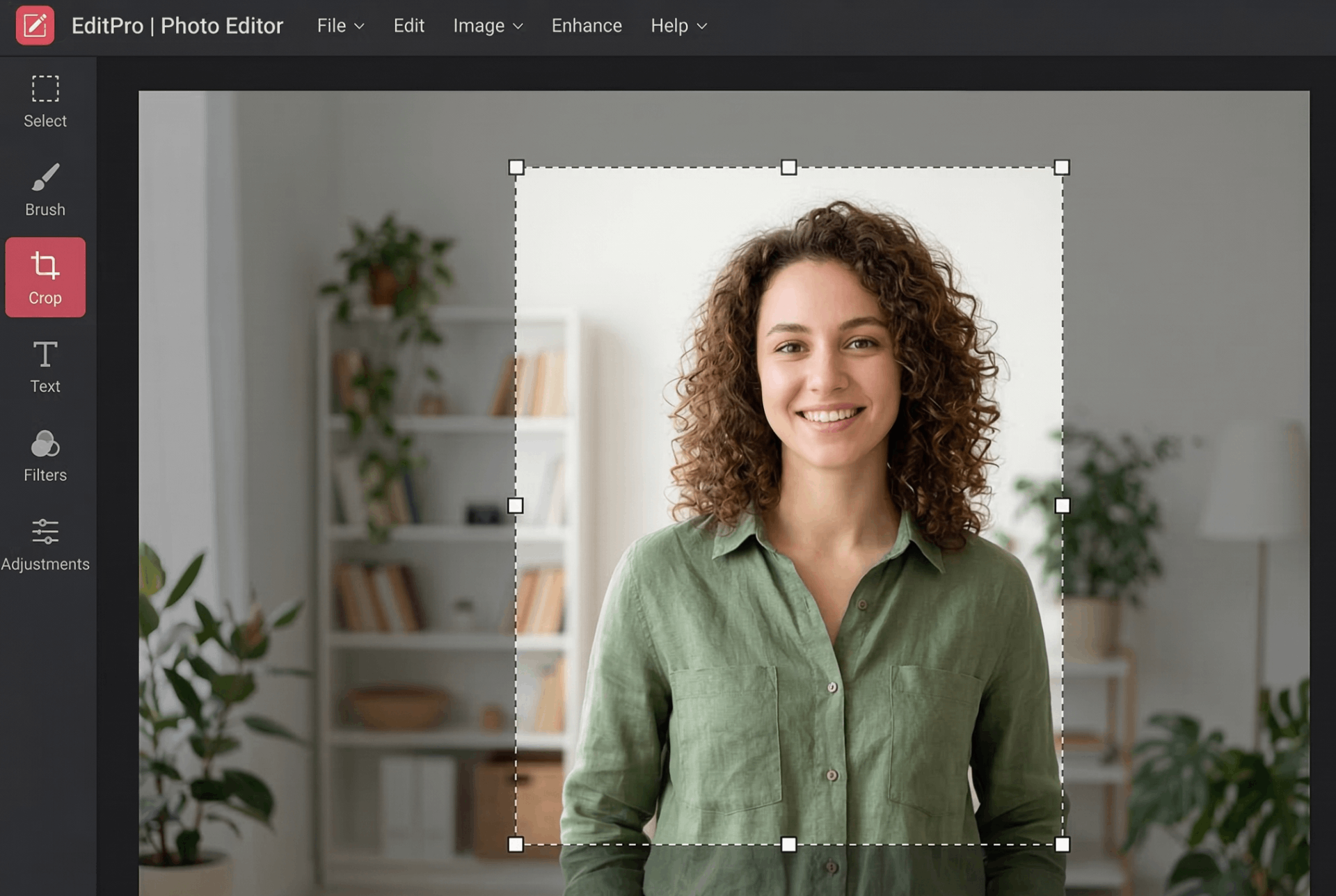
Original Image (Uncropped)
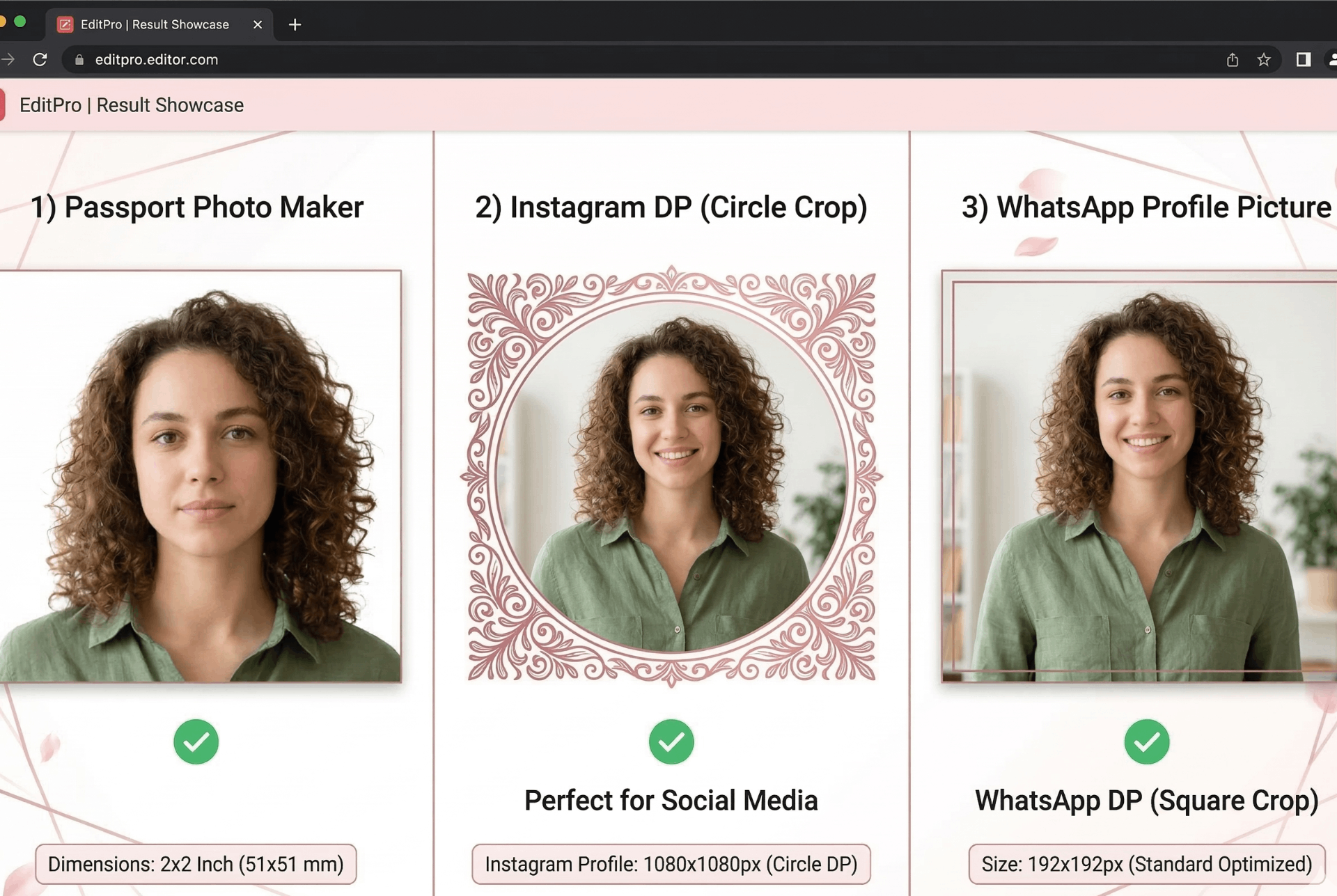
Perfectly Cropped Results
⚡ Circle crop, passport dimensions, Instagram DP, WhatsApp profile pictures – all with borders and custom backgrounds.
How to Crop Image Online – Circle, Passport, DP & More
Whether you need a circle crop for Instagram DP, a passport photo with exact dimensions, or a WhatsApp profile picture with border, our advanced cropper handles it all – without losing quality.
1. Upload Image
Drag & drop any JPG, PNG, or WEBP. Your file stays in your browser – 100% private, no uploads.
2. Choose Shape & Size
Select rectangle or circle. Pick a preset: Instagram DP (180x180), WhatsApp DP (500x500), passport 2x2, and more.
3. Add Border & Background
Customize border color and width. Set background color – white for passport photos, any color for creative crops.
4. Download
Click "Apply & Download" – your cropped image saves instantly. No watermarks, no signup.
Why Choose Our Cropper?
- Crop image online – Fast, free, and private. No server uploads means your photos stay secure.
- Circle crop image – Perfect for profile pictures, avatars, and circular logos. Add a border for extra style.
- Passport photo maker – Built-in presets for 2x2 inch, 35x45 mm, and more. White background option meets official requirements.
- Instagram DP size – 180x180 and 320x320 presets ensure your profile picture looks crisp on all devices.
- WhatsApp profile picture – Use the 500x500 preset for the best quality on WhatsApp. Circle crop recommended.
- Image cropper with border – Add colored borders to any crop. Control width and color in real-time.
🎯 Perfect For
Instagram DP
180x180 circle cropWhatsApp DP
500x500 with borderPassport Photos
2x2 inch, white bgProfile Avatars
Circle with borderFree Photo Editor, No Limits
Unlike other tools that limit features or add watermarks, our free photo editor gives you everything: circle crop, borders, backgrounds, and exact size presets – all free forever.
Passport Photo Maker – Official Dimensions
Creating compliant passport and visa photos is easy with our built-in presets. Follow international standards:
🇺🇸 US Passport
2x2 inch (600x600 px) with white background. Head height 1-1⅜ inches, centered.
🇪🇺 EU Visa
35x45 mm (413x531 px) – standard for Schengen visas. White or light gray background.
🌏 International
30x40 mm and 20x25 mm presets available. All with proper resolution (300 DPI).
For official guidelines, refer to U.S. State Department or EU Visa Policy.
🎨 Circle Crop Image with Border & Background
Circle Crop with Border
Choose any border color and width (1-20px). Perfect for Instagram profile pictures, YouTube avatars, and branding. The border stays crisp even at small sizes.
Circle Crop with White Background
Add a clean white background behind your circle crop. Ideal for product photos, logos, or any image that needs to stand out. The background color is fully customizable.
📱 Social Media Profile Picture Sizes
Instagram DP
180x180 pixels – recommended size. Circle crop looks best. Also supports 320x320 for high-res displays.
WhatsApp DP
500x500 pixels – ideal for profile pictures. Circle crop with border recommended for best appearance.
Facebook DP
400x400 pixels – minimum size. Square or circle crop both work well.
Learn more about social media image sizes from Instagram Help Center and WhatsApp FAQ.
Frequently Asked Questions
How to crop image online for free?
Upload your image, adjust the crop handles, choose your desired shape and size, then download. No signup, no watermarks, 100% free.
Can I circle crop an image for Instagram DP?
Yes! Select 'Circle' from crop shape dropdown, then choose Instagram DP preset (180x180). Add a border if desired. Perfect for profile pictures.
How to make passport photo online?
Select '2x2 inch (600x600 px)' from passport presets. Crop your face properly (head height 1-1⅜ inches), set background to white, and download. Compliant with US passport requirements.
What are the best WhatsApp profile picture dimensions?
WhatsApp recommends 500x500 pixels for profile photos. Select 'WhatsApp DP (500x500)' preset and circle crop for the best look.
Can I add a border to my cropped image?
Absolutely! Use the border controls to choose color and width (0-20px). Works with both rectangle and circle crops.
Is this really a free photo editor?
Yes, completely free with no hidden limits. No watermarks, no signup, no premium tiers. Use it as much as you need.
How We Compare to Other Photo Editors
| Feature | InstantConvert | Other Free Editors |
|---|---|---|
| Circle crop with border | ✅ Yes | ⚠️ Limited / Pro |
| Passport photo presets | ✅ Multiple | ❌ Rare |
| Social media DP sizes | ✅ Instagram, WhatsApp, Facebook | ⚠️ Limited |
| Client-side privacy | ✅ 100% | ❌ Server upload |
| Background color control | ✅ Yes | ⚠️ Limited |
✨ Only InstantConvert gives you professional crop tools + privacy + free forever.