mp4 to jpg sequence
Drop MP4 video
MP4, WebM, OGG — 100% private
All processing local · GPU accelerated
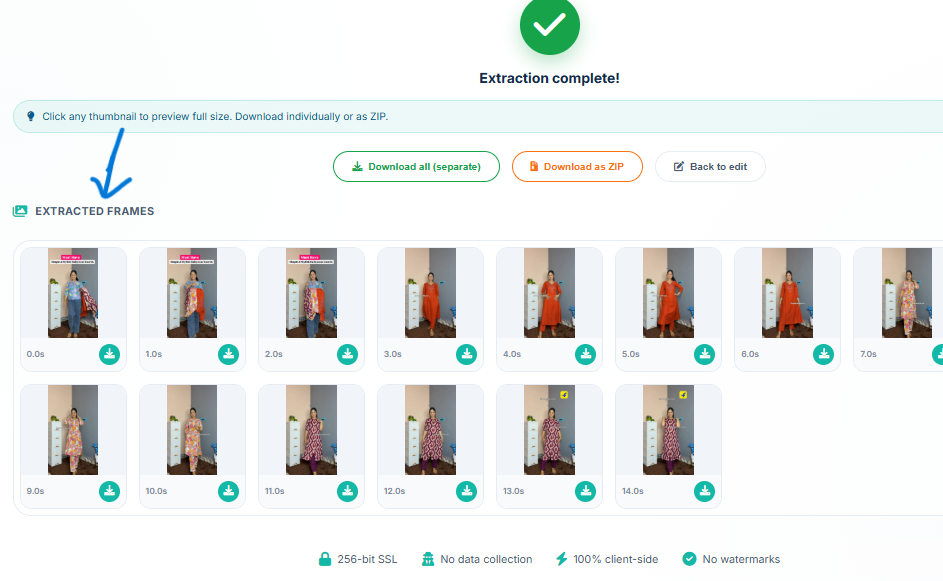
Extraction complete!
From Video to High‑Quality JPG Sequence
Original MP4 Video
JPG Image Sequence
⚡ Extract frames from video online – preview gallery, download individually or as ZIP. All client‑side, no upload.
Smart Frame Extraction with Gallery Preview
Most tools make you download a massive ZIP blindly. Our MP4 to JPG sequence converter lets you see every extracted frame before you download.
🖼️ Live Preview Gallery
Every extracted frame is shown as a thumbnail with its timestamp. Click any image to view it full‑size before saving.
⚙️ Flexible Extraction
Choose to extract by time interval (e.g., every 2 seconds) or by total number of frames – perfect for creating animated sequences or thumbnails.
📦 Download Options
Download single frames, all frames as separate files (staggered download), or a ZIP archive. No watermarks, no signup.
🔒 100% Client‑Side
Your video stays on your device. All processing happens in your browser using HTML5 Canvas – completely private.
How to Extract Images from Video Online (MP4 to JPG)
Need to extract frames from video online for a stop‑motion project, social media, or analysis? Follow these simple steps:
1. Upload Video
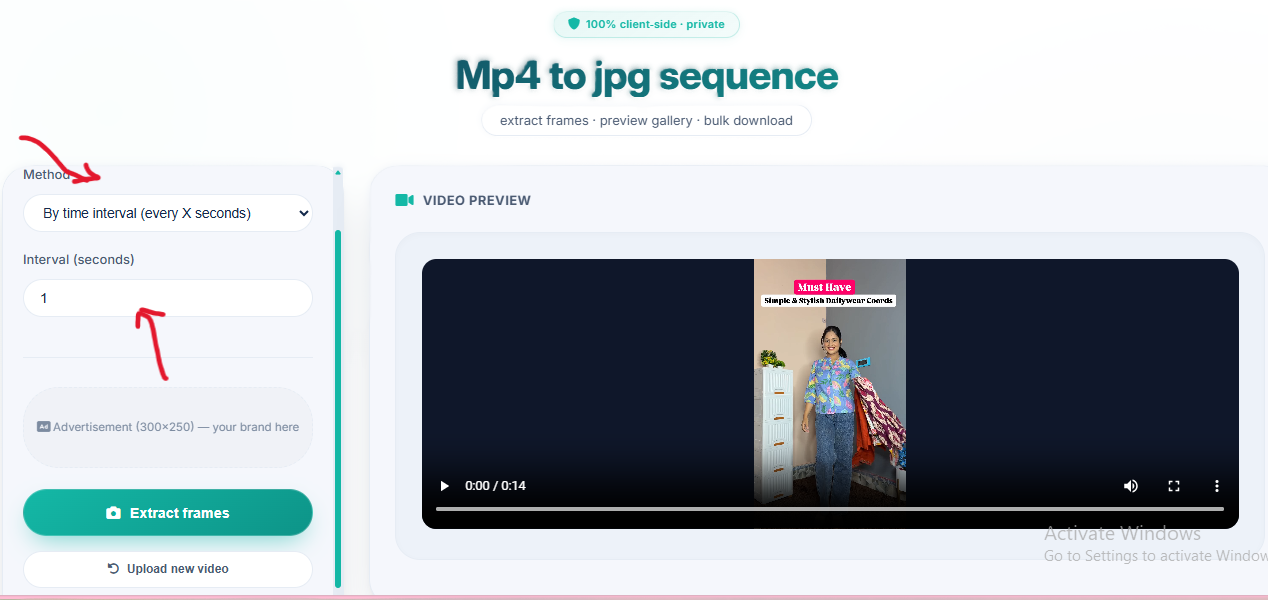
Drag & drop your MP4, WebM, or OGG file – no size limits, client‑side processing.
2. Choose Extraction Method
Pick time interval (e.g., every 1 second) or specify total number of frames for precise control.
3. Extract Frames
Click "Extract Frames Now" – watch the progress as each frame is captured in your browser.
4. Preview & Download
Review thumbnails in the gallery, then download individual images, all as separate files, or as a ZIP archive.
Why Choose Our Video to JPG Converter?
- MP4 to JPG sequence converter online – Extract all frames from your video with a single click.
- Video to JPG converter high quality – Images are saved at original resolution, preserving detail and color.
- Extract images from video online – No upload, no servers – 100% client‑side processing.
- Extract frames from video online – Choose by interval or total count for precise control.
- Frame by frame video online – The total‑frames method lets you extract an exact number of evenly spaced frames, giving you frame‑by‑frame granularity.
🎯 Perfect For
Stop‑Motion
Extract frames for animationVideo Analysis
Capture frames for researchSocial Media
Create video previewsPhotography
Capture stills from footage100% Client‑Side, No Upload
Your video never leaves your device. Process unlimited videos – completely private and secure.
🎞️ How We Extract High‑Quality JPGs from Video
We use the HTML5 Video API and Canvas to read your video frame by frame directly in your browser, then export each frame as a high‑quality JPG image.
🎬 Frame Accuracy
Precise seeking to any timestamp using the browser's built‑in video player – no server‑side conversion needed.
🖼️ Original Resolution
JPGs are saved at the video's native width and height, preserving every detail.
⚡ Real‑time Progress
A progress bar and live status keep you informed during extraction.
Frequently Asked Questions
How to convert MP4 to JPG sequence online?
Upload your video, choose interval or frame count, then click extract. Preview every frame before downloading. All processing stays in your browser – no upload.
Can I get high quality JPGs from video?
Yes! Our tool extracts frames at original video resolution. Each JPG is saved at 90% quality, preserving detail and clarity.
How to extract images from video online without uploading?
Our tool is 100% client-side. Your video never leaves your device – all extraction happens locally using HTML5 Canvas.
Can I extract frame by frame from video?
Yes! Use the 'Total Images' method to specify how many frames you want evenly spaced from the video, effectively giving you frame‑by‑frame control.
Why does "Download All" ask for permission?
Browsers protect you from spam. To save multiple images at once without zipping them, you must allow "Automatic Downloads" for our site.
My ZIP download failed. Why?
If you extract hundreds of frames, the ZIP creation might run out of memory. Use the "Download All (Recommended)" option or download images individually from the gallery.
How We Compare to Other Video to JPG Tools
| Feature | InstantConvert | Other Free Tools |
|---|---|---|
| Live preview gallery | ✅ Yes | ❌ No preview |
| Extract by interval or total frames | ✅ Both | ⚠️ Usually interval only |
| High quality (original resolution) | ✅ Yes | ❌ Often downscaled |
| Client‑side (no upload) | ✅ 100% | ❌ Server upload required |
| Download options | ✅ Individual, all, ZIP | ⚠️ Usually ZIP only |
✨ Only InstantConvert gives you a preview gallery, flexible extraction, and multiple download methods – all private and free.