Free PDF Metadata Viewer & Editor
Inspect document properties, view hidden data in PDF files, edit tags, or clean metadata from PDF files 100% privately in your browser RAM.
or drop PDF files here to view hidden data in PDF & clean metadata
PDF Metadata Rebuilt & Ready!
Your PDF has been losslessly processed with DSLR photo clarity intact. You can download the updated document or export the metadata properties below:
How to View Hidden Data in PDF & Clean Metadata
A lightning-fast 3-step visual workflow designed for high-resolution inspection and lossless sanitization.
Upload PDF documents
Inspect, edit, or wipe tags
Save PDF or export reports
How Our PDF Metadata Viewer & Remover Engine Works
Learn the step-by-step mechanism behind our private, client-side PDF catalog parsing and lossless dictionary rebuilding pipeline.
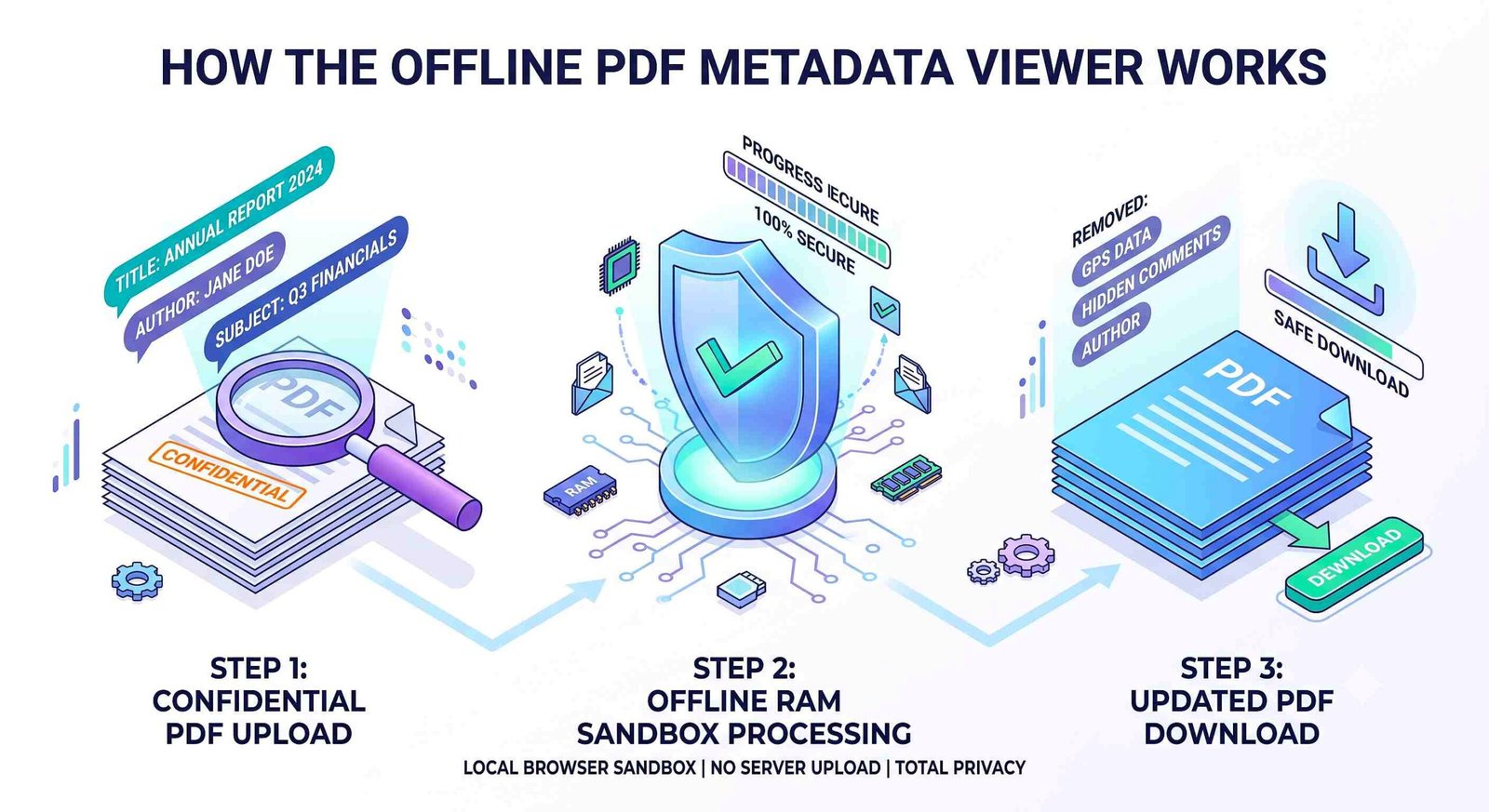
Local Catalog Stream Ingestion
Your PDF file streams directly into your device's private volatile RAM. Our WebAssembly parser reads the root trailer dictionary without sending a single byte across external networks.
Info & XMP RDF Decoding
The engine isolates both legacy Standard Information Dictionaries and modern Adobe Extensible Metadata Platform (XMP) RDF packets, exposing Title, Author, and Producer streams.
Lossless DSLR & Vector Preservation
When you clean metadata from PDF files, only header dictionaries are sanitized. All embedded portrait photos, vector text curves, and color grading profiles remain 100% untouched.
Multi-Format Re-Serialization
Download your sanitized, ISO-compliant PDF or export extracted metadata into clean TXT reports, JSON payloads, CSV spreadsheets, or raw Adobe XMP XML packets instantly.
Powerful Performance Features
Engineered for airtight local privacy, instant catalog inspection, lossless photo preservation, and multi-format exporting.
100% In-Browser Privacy
Your files never leave your device. All parsing and wiping happen strictly in your browser RAM.
Lossless Photo Integrity
Preserves embedded DSLR portraits and high-res photos with zero degradation or tonal shift during wipe.
Multi-Format Exporter
Export extracted metadata records into TXT reports, JSON payloads, CSV tables, or Adobe XMP XML files.
Bulk Multi-File Processing
Upload multiple PDF files simultaneously. View, edit, or wipe metadata across all files in a single click.
Live Custom Metadata Editor
Modify Title, Author, Subject, Keywords, and Software tags to customize file attributes cleanly.
Zero Software Installation
Runs 100% in your browser. No plugins, no desktop applications, and no registration required.
Comprehensive PDF Metadata Architecture & Data Sanitization
Discover the hidden information inside your documents with our free PDF metadata viewer. Whether you need to inspect author details, edit PDF metadata online, or securely clean metadata from PDF files before sharing, our client-side engine provides complete protection.
What is a PDF Metadata Viewer & What Hidden Data Does It Reveal?
Every Portable Document Format file consists of visual layout streams (fonts, vector curves, raster images) encapsulated alongside an administrative metadata catalog. When standard viewers render a document, this metadata layer remains invisible to casual readers.
Utilizing our pdf metadata viewer unlocks this hidden catalog, exposing parameters such as the document Title, Author identity, Subject description, categorizing Keywords, internal corporate user paths, creating software, and PDF producer libraries.
- View hidden data in PDF files including usernames, editing timestamps, and software versions.
- Inspect synchronized Adobe XMP RDF streams alongside standard catalog dictionaries.
- Audit corporate compliance, legal e-discovery records, and academic research preprints.
Lossless Rebuilding: Preserving DSLR Quality During Metadata Removal
Many conventional online metadata tools rebuild PDF documents by re-compressing entire page canvases, degrading embedded photos, softening facial portraits, and introducing chromatic banding.
Our advanced pdf metadata remover performs surgical header manipulation. When you clean metadata from PDF files with our engine, only structural dictionary pointers are sanitized. Embedded DSLR photos, corporate headshots, and high-res figures maintain 100% optical sharpness and accurate color grading.
- Zero raster re-compression: Embedded images maintain exact original byte-level fidelity.
- Perfect facial feature consistency and studio lighting integrity on all portraits.
- Preserves vector curves, TrueType typography, and PDF form fields completely intact.
Client-Side Privacy: Why In-Browser Processing Beats Cloud Servers
Uploading confidential agreements, medical charts, or corporate financials to third-party cloud servers creates severe regulatory exposure and privacy vulnerabilities.
Our pdf metadata viewer and sanitizer executes entirely inside your browser sandbox via JavaScript WebAssembly. Your files are loaded into volatile RAM, modified locally, and saved directly to your hard drive without internet transmission.
- Zero cloud uploads: No external servers, temporary databases, or data harvesting.
- Complete offline capability: Operates seamlessly without an active internet connection.
- Easily edit PDF metadata online or wipe author names prior to distribution.
International Document Standards & Industry Specifications
Professional document archival requires strict compliance with international metadata definitions. To understand how catalog headers and XMP serialization function under the hood, review these authoritative references:
- Review PDF catalog structures in the Adobe ISO 32000-1 PDF Reference Specification.
- Learn document preservation best practices from the PDF Association Resource Center.
- Explore Dublin Core schemas on the W3C Dublin Core Metadata Initiative.
Frequently Asked Questions
Everything you need to know about our private, in-browser PDF metadata inspection and removal engine.
A pdf metadata viewer is a specialized document inspection tool that decodes administrative data embedded in PDF catalogs. It allows you to view hidden data in PDF files such as title tags, author names, subject summaries, keywords, creating software, PDF producer libraries, and timestamps.
Our pdf metadata remover operates entirely on your local browser. It securely strips away sensitive information like author names, software used, and creation dates without ever uploading your file to any external server.
Absolutely. When you clean metadata from PDF using our tool, our advanced engine ensures that all embedded portraits and photos retain their exact DSLR-like quality, expert color grading, and facial consistency without raster re-compression.
Yes! Along with viewing and deleting, our platform allows you to edit pdf metadata online. You can easily change the author, title, subject, and keywords to customize document properties to your liking.
It is important to view hidden data in pdf files before sharing them publicly because PDF headers frequently contain private information such as internal username paths, corporate editing software, and modification histories.
Yes. Our tool features a multi-format exporter that allows you to download your metadata as a clean Text report (.txt), structured JSON payload (.json), CSV spreadsheet (.csv), or raw Adobe XMP XML packet (.xml).